If your prepaid refill didn’t go through, the cause is almost always something simple: a wrong phone number, a payment method that got declined, or a carrier-side delay. None of them mean your money is gone, and most clear up in a few minutes once you know which one you’re dealing with. Here’s how to tell them apart and fix each one.
Before you retry, check one thing: did the balance actually not update, or did it just not update yet? A refill usually posts within a minute, but a carrier processing delay can stretch it to 15 minutes or more. Give it a few minutes and recheck the balance before you assume it failed. Retrying too fast is how people end up with a double charge.
Most Common Reasons a Refill Fails#
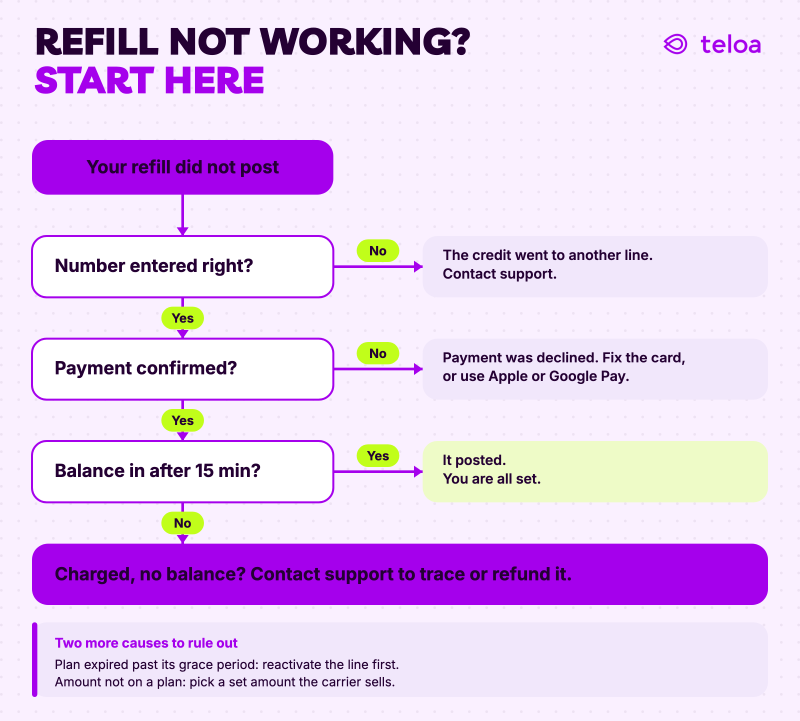
Nearly every failed refill traces back to one of these five causes:
- Wrong phone number. The most common one by far. The credit follows the number you enter, so a single wrong digit sends it to a stranger’s line (or to a number that doesn’t exist, which is why the refill won’t complete).
- Payment method declined. Insufficient funds, an expired card, or your bank flagging the charge. Banks often block a first-time online refill as a suspicious transaction, especially if the amount or merchant is new to them.
- Carrier processing delay or outage. The payment went through on your end, but the carrier’s system is slow or temporarily down, so the balance hasn’t posted yet. This is a wait, not a failure.
- The plan already expired past its grace period. If the number has been inactive too long, the account may be suspended, and a standard refill won’t reactivate it until the line is restored.
- The amount doesn’t match an available plan. Some carriers only accept refills in set amounts or for specific plans. An amount that doesn’t map to anything on their side gets rejected.
How to Fix Each Issue#
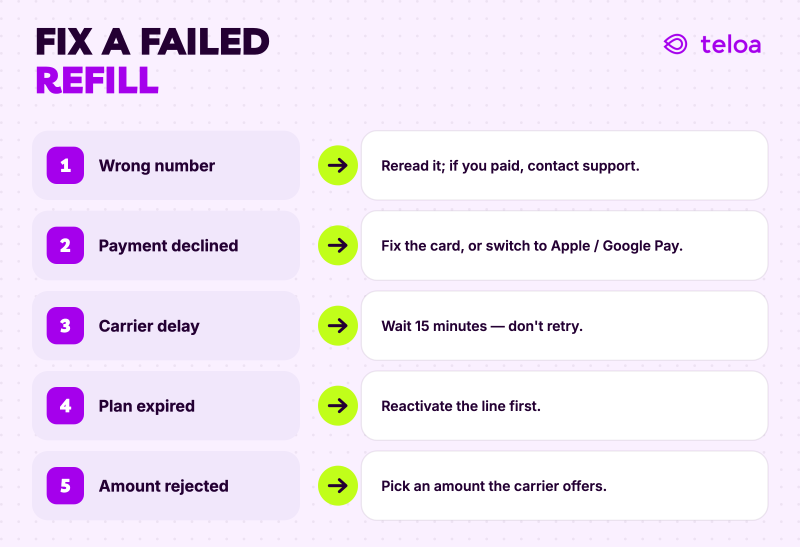
If you entered the wrong number. Stop before you retry and read the number back digit by digit. If you already paid and the credit went to a wrong-but-valid number, that credit usually can’t be clawed back. Contact the platform’s support and explain what happened. If the number was invalid, the refill simply won’t have completed and you can re-enter the correct one.
If your payment was declined. Check the basics first: enough funds, card not expired, billing details correct. If all of that looks fine, the block is likely on your bank’s side. Call the number on the back of your card and tell them to approve the charge, or try a different payment method: Apple Pay, Google Pay, PayPal, or another card. Paying with Apple Pay or Google Pay also sidesteps a lot of manual-entry declines, since the details are already verified on your device.
If it’s a carrier delay. Don’t retry. Wait 15 minutes and recheck the balance. Retrying while the first refill is still processing is the fastest way to get charged twice. If it still hasn’t posted after that, it’s time to check where the problem actually lives (next section).
If the plan expired past its grace period. The line may need to be reactivated before a refill will stick. Check the carrier’s reactivation window for that number. Some carriers restore the same number if you act within a set number of days, after which it is released.
If the amount was rejected. Pick a refill amount or plan the carrier actually offers for that number instead of a custom amount. On a platform that reads the carrier off the number, the available options are shown for you, so there’s nothing to guess.
Always confirm it worked. However you fix it, verify the balance actually posted before you walk away: check the recipient’s balance directly, or watch for the carrier’s confirmation text with the new amount. A confirmation on the payment side means you paid; the balance update means the airtime landed.
When to Contact Your Carrier vs. Your Refill Platform#
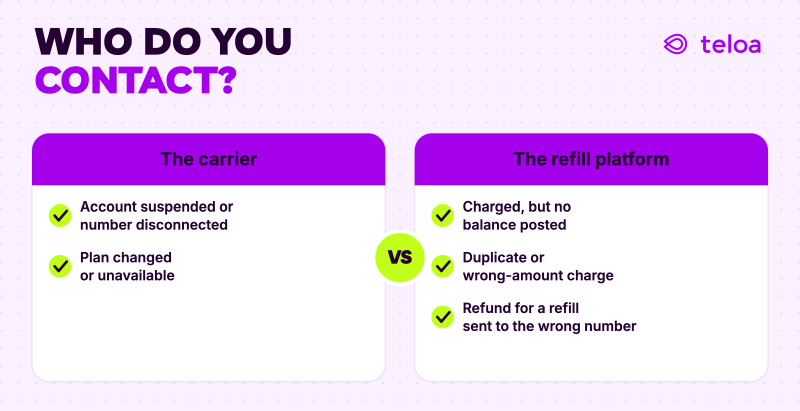
Once you’ve ruled out a wrong number and a bad payment, a stuck refill is either a carrier problem or a platform problem, and knowing which saves you from bouncing between two support lines.
It’s a carrier issue when the account is suspended, the number has been disconnected, or the plan itself changed. The carrier owns the line and the plan, so anything about the account’s status is theirs to fix.
It’s a platform issue when you were charged but the balance never posted, you see a duplicate charge, or the wrong amount went through. The platform ran the payment, so anything about the transaction is theirs.
This is where the platform you chose matters. A lot of refill problems are time-sensitive: a phone that’s about to go dark, a charge you need reversed today, and getting stuck in an automated phone tree is its own kind of failure. Teloa backs these moments with real people, seven days a week in English and Spanish: a charge that posted without a balance, a duplicate, a refill that needs sorting out. No chatbot loops, no phone trees.
If you want to avoid the “did my refill go through?” question entirely, AutoPay handles the timing for you: the line refills on schedule each month, so a missed due date never becomes a dead line. And if you’re topping up someone else’s phone, our guide on how to refill someone else’s prepaid phone covers what you need and how to send it safely.
FAQ#
I was charged but my balance didn’t update. What do I do?#
First, wait 15 minutes and recheck. Carrier delays are common, and the balance often posts on its own. If it still hasn’t after that, don’t retry (you’ll risk a second charge). Contact your refill platform’s support with your confirmation details: the payment is on their side, so they can trace it and either push the balance through or refund the charge. On Teloa, real human support (seven days a week, in English and Spanish) handles this directly.
How long does a refill take to show up on my phone?#
Usually within a minute. A carrier processing delay can stretch it to 15 minutes or, in a rare outage, longer. If you got a payment confirmation, the money went through. The balance is just waiting on the carrier to post it.
Can I get a refund if my refill went to the wrong number?#
Sometimes, but don’t count on it. The credit follows the number you entered, and once it posts to a valid line it usually can’t be reversed. Contact the platform’s support right away. The sooner you flag it, the better your odds. This is why reading the number back twice before you pay matters more than any step after.
Why does my bank keep declining my refill payment?#
Banks flag charges they don’t recognize, and a first-time refill to a new merchant is a classic trigger. Call the number on the back of your card and ask them to approve it, or switch to Apple Pay, Google Pay, or PayPal; those carry pre-verified details and clear a lot of the declines that manual card entry runs into.
Should I just keep retrying until it works?#
No. If the payment was declined, fix the cause first. Retrying the same declined card won’t change the result. If it’s a carrier delay, retrying can charge you twice for one refill. Diagnose which of the two it is before you try again.
My refill amount keeps getting rejected, why?#
Some carriers only accept refills in set amounts or tied to specific plans, so a custom amount gets bounced. Choose an amount or plan the carrier actually offers for that number. On a platform that detects the carrier from the number, the valid options are shown for you.