
Yes, you can refill your prepaid phone or pay your monthly phone bill with Cash App. It takes less than a minute, and you never have to type in a card number.
Below we cover how Cash App works as a payment method, whether it’s safe, and exactly where and how to pay your prepaid plan with it.
Where to Refill Your Phone with Cash App: Teloa#
To pay your phone with Cash App, you need a refill service that accepts it. Teloa does, on both its website and app, for every carrier it supports. Cash App works the same way no matter which carrier you’re on.
The most common refill on Teloa is a T-Mobile prepaid refill , and paying with Cash App makes it a few seconds faster. If you pay your H2O Wireless bill or do a Simple Mobile bill pay every month, you’ll find Cash App at checkout for those too.
Same goes for an AT&T prepaid refill , a Metro by T-Mobile payment , a Lyca Mobile top-up , a Boost Mobile recharge , a Cricket refill , or a Verizon prepaid refill .
How to Pay with Cash App#
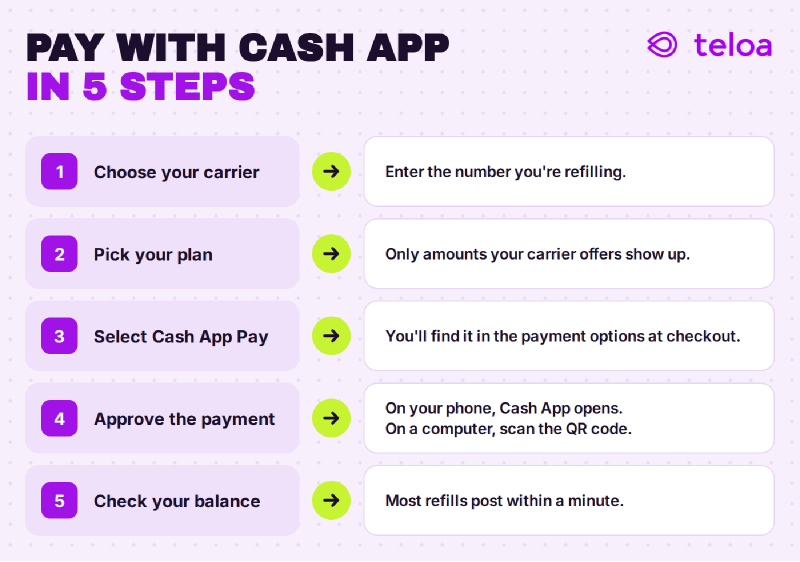
Paying with Cash App on Teloa follows the same process as any other refill. Select your carrier, enter the phone number, and choose your plan. At checkout, select Cash App as your payment method.
If you’re on your phone, Cash App will open automatically so you can approve the payment; if you’re on a computer, scan the QR code shown on screen. Once the payment is approved, your refill is processed right away and, in most cases, posts in under a minute.
Teloa also accepts Cash App for AutoPay. Just turn it on once and select Cash App as your payment method; from then on, your line will refill automatically on each due date.
How Cash App Works as a Payment Method#
Most people know Cash App for sending money to friends. It also works as a way to pay online stores and services through Cash App Pay. When a site offers it at checkout, you pick Cash App Pay, approve the charge in the app, and the money comes out of your Cash App balance or the debit card linked to it.
That makes it a good fit for phone refills. About 59 million people use Cash App every month , and for many of them it’s where their money actually lives. Having to dig out a card just to top up a phone is one step too many.
Is It Safe to Pay Your Phone Bill with Cash App?#
Yes, and in some ways it’s safer than typing in a card. With Cash App Pay, the site you’re paying never sees your Cash App login or your card number. You approve the payment inside Cash App, the same way you would with any other purchase. If you’re weighing your options, our guide on how to refill your prepaid phone online safely compares the most common payment methods.
There’s also a practical upside: declined card payments are one of the most common reasons a refill fails. Paying from your Cash App balance skips manual card entry entirely.
Why Pay Your Phone Plan Online#
Paying online means no trip to a store and no waiting in line. You can refill at any hour, from your couch or from another city, and the balance usually posts within a minute. It also makes it easy to refill a family member’s line from wherever you are; our guide on how to refill someone else’s prepaid phone walks through it. And once you’re paying online, you can stop thinking about it altogether: turn on AutoPay and your line refills itself every month, with 5% off from your second refill and the usual 3% back in Teloa credit.
Troubleshooting a Cash App Refill#
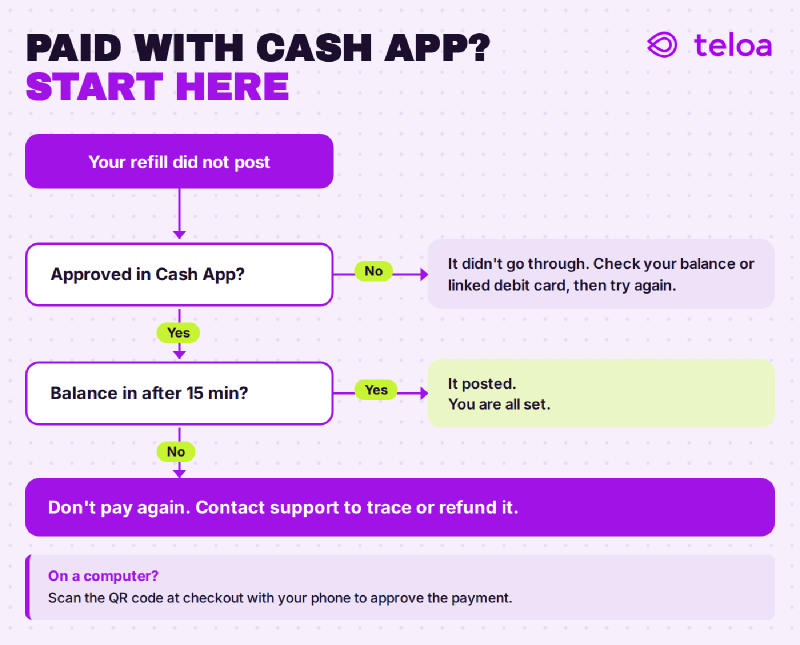
If Cash App says your payment went through but your phone balance hasn’t updated, start here:
If none of this works, see why a prepaid refill isn’t working and how to fix it , or contact Teloa Customer Support .
What to Know Before You Pay#
- It draws from your Cash App balance or linked debit card. Make sure one of them covers the amount before you check out.
- Paying is instant, but posting isn’t always. Cash App confirms your payment in seconds. The balance update comes from your carrier and occasionally takes up to 15 minutes. Wait before you retry: retrying too fast is how people end up paying twice.
- Your other payment methods still work. Cash App is an extra option on Teloa, not a replacement. Saved cards, Apple Pay, Google Pay, and PayPal are all still there.
FAQ#
How fast does a refill arrive if I pay with Cash App? The payment is confirmed in seconds and most refills are posted in under a minute. If your carrier has a delay issue, the balance can take up to 15 minutes.
Can I pay with a credit card through Cash App? Cash App Pay uses your Cash App balance or a linked debit card. If you’d rather use a credit card, you can enter one directly at checkout on Teloa.
I paid with Cash App, but my balance didn’t update. What should I do? Wait 15 minutes and check again, since carrier delays are common. Don’t pay a second time. If it still hasn’t shown up, check the payment in your Cash App activity, then contact Teloa support with the time and amount. The payment runs through Teloa, so support can trace it and either push the refill through or refund it. Support is run by real people, seven days a week, in English and Spanish.
Can I use Cash App with AutoPay? Yes. When you set up AutoPay on Teloa, choose Cash App as your payment method and your line refills automatically on schedule each month. Just keep enough in your Cash App balance or linked debit card to cover the refill on the due date.
Can I use Cash App to refill someone else’s phone? Yes. Just enter their number instead of yours.
Try It on Your Next Refill#
Next time you refill your prepaid plan on Teloa , look for Cash App at checkout. Prefer Spanish? You can do the same thing on Teloa en español . If anything doesn’t work the way it should, let us know. We’re always fine-tuning the experience based on what you tell us.